Vertical Slice Example
Organize code by feature, not by layer - and see the full architecture in action through quest completion.
Layers Are Not Folders
A common argument against Clean Architecture is that separating code across layer folders results in scattered, hard-to-navigate codebases - every feature spread across the entire project tree. It’s a common misunderstanding of the original concept. The architecture layers describe dependency rules - what is allowed to reference what. They don’t prescribe folder structure. When you treat them as top-level folders, you get a codebase organized by architectural role instead of by what your game actually does.
The quest system needs a new reward type. You open the Controllers folder and scroll past 40 files to find QuestController. You open the Views folder and hunt for QuestLogView. You open the Entities folder for QuestState. You open the Services folder for QuestPersistence. Every change to one feature means touching every folder in the project. Adding a feature means creating files in six different places. Deleting a feature is archaeology - which files across which folders belong to the abandoned trading system?
This isn’t a problem with layers. It’s a problem with organizing by layer instead of by feature.
Slice, Not Layer
The principle is simple: a feature is a vertical cut through all appropriate layers. It has its own Core, its own Use Cases, its own Controllers, and its own Views. The feature folder contains everything the feature needs. When you open Features/Quests/, you see the entire quest system - entities, interfaces, orchestration, UI - all in one place.
Cross-feature interaction happens only through Use Case interfaces. The quest system doesn’t reach into the inventory system’s Core or Controllers. It depends on IAddItem - a Use Case interface that the inventory feature publishes. This is the same dependency rule applied at the feature level.
The Architecture Model describes this in the “Features Become Independent” section. Vertical slices are how you make that independence concrete in your project structure.
Anatomy of a Slice: Quest Completion
Let’s make this tangible. Quest completion is a feature that touches every layer: domain state, orchestration, cross-feature coordination, UI, and async flows. Here’s how it looks as a vertical slice.
Directory Structure
Features/
  Quests/
    Core/
      QuestLog              // entity - owns quest state
      QuestState            // value object - pending, active, completed, rewarded
      IQuestLog             // interface - port for the quest log
      OnQuestCompleted      // event - signals completion to the world
    UseCases/
      ICompleteQuest        // interface - the feature's public API
      CompleteQuestUseCase  // implementation - orchestrates the flow
      IRewardDialog         // private interface - what the use case needs from UI
    Controllers/
      QuestLogController    // subscribes to domain events, drives the quest list view
      RewardDialogController // manages the reward claim flow
    Views/
      QuestLogView          // engine-specific quest list UI
      RewardDialogView      // engine-specific reward dialog UI
    Tests/
      QuestLogTests         // domain logic tests
      CompleteQuestTests    // use case orchestration tests
      QuestIntegrationTests // full-flow integration tests
Everything related to quests lives under Features/Quests/. Open the folder, and you see the entire feature. Delete the folder, and the feature is gone (except for the Use Case interfaces that other features depend on - which tells you exactly what needs updating).
The Core
The Core contains the domain truth - what quests are, independent of any engine, UI, or persistence mechanism.
// QuestState - value object
public enum QuestState { Pending, Active, Completed, Rewarded }

// QuestLog - entity
public class QuestLog : IQuestLog {
    private readonly Dictionary<QuestId, QuestState> _quests = new();

    public EventSource<QuestId> OnQuestCompleted { get; } = new();

    public void Complete(QuestId questId) {
        Assert(_quests[questId] == QuestState.Active);
        _quests[questId] = QuestState.Completed;
        OnQuestCompleted.Emit(questId);
    }

    public void MarkRewarded(QuestId questId) {
        Assert(_quests[questId] == QuestState.Completed);
        _quests[questId] = QuestState.Rewarded;
    }
}
The QuestLog entity owns its invariants. You can’t complete a quest that isn’t active. You can’t claim rewards for a quest that isn’t completed. These rules exist in the Core, with no dependencies on anything outside it.
OnQuestCompleted is a domain event - the Core announces what happened without knowing or caring who listens. (See Event Systems for the full pattern.)
The Use Case Interface
The Use Cases layer contains exactly one thing for this feature: the public contract.
// ICompleteQuest - the only thing other features see
public interface ICompleteQuest {
    UniTask CompleteAndClaimReward(QuestId questId);
}
This is the feature’s API. Other features - and the feature’s own Controllers - depend on this interface. They never touch the Core or use case implementations directly. When another team member needs to interact with quests, this interface is the starting point and the boundary.
The Use Case Implementation
The Use Cases layer is where orchestration happens. The CompleteQuestUseCase implements the Use Case interface and coordinates the full flow.
// CompleteQuestUseCase - orchestrates the complete-and-reward flow
public class CompleteQuestUseCase : ICompleteQuest {
    private readonly IQuestLog _questLog;          // Core port
    private readonly IAddItem _inventory;          // Use Case from Inventory feature
    private readonly IGrantXP _progression;        // Use Case from Progression feature
    private readonly IRewardDialog _rewardDialog;  // Controller interface (defined in Use Cases)

    public CompleteQuestUseCase(
        IQuestLog questLog, IAddItem inventory,
        IGrantXP progression, IRewardDialog rewardDialog) {
        _questLog = questLog;
        _inventory = inventory;
        _progression = progression;
        _rewardDialog = rewardDialog;
    }

    public async UniTask CompleteAndClaimReward(QuestId questId) {
        var quest = _questLog.GetQuest(questId);
        Assert(quest.State == QuestState.Active);

        // Step 1: Update domain state
        _questLog.Complete(questId);
        // OnQuestCompleted fires here - other systems react

        // Step 2: Calculate rewards
        var rewards = quest.Definition.Rewards;

        // Step 3: Show reward dialog and wait for player
        var claimed = await _rewardDialog.ShowAndWaitForClaim(rewards);
        if (!claimed) return;

        // Step 4: Grant rewards through other features' Use Cases
        foreach (var item in rewards.Items)
            _inventory.AddItem(item);
        _progression.GrantXP(rewards.XP);

        // Step 5: Mark quest as fully rewarded
        _questLog.MarkRewarded(questId);
    }
}
Notice the cross-feature interaction. The quest system grants items through IAddItem and awards XP through IGrantXP - Use Case interfaces published by the Inventory and Progression features. It never touches their internal state. It doesn’t know how items are stored or how XP is calculated. It only knows the contracts.
The rewardDialog dependency is also an interface, but a private one - defined in the Use Cases layer and implemented by a Controller. This is the dependency inversion that lets the Use Cases layer drive the UI without depending on it.
The Controllers
The Controllers layer bridges the Use Cases and the Views - reacting to domain events, handling input, and driving the UI.
// QuestLogController - reacts to domain events, drives the view
public class QuestLogController {
    private readonly IQuestLog _questLog;
    private readonly IQuestLogView _view;

    public QuestLogController(IQuestLog questLog, IQuestLogView view) {
        _questLog = questLog;
        _view = view;
    }

    public void OnInitialize() {
        _questLog.OnQuestCompleted.Subscribe(HandleQuestCompleted);
        RefreshView();
    }

    private void HandleQuestCompleted(QuestId questId) {
        RefreshView();
        _view.PlayCompletionAnimation(questId);
    }

    private void RefreshView() {
        var quests = _questLog.GetAllQuests();
        _view.DisplayQuests(quests);
    }
}

// RewardDialogController - manages the claim flow
public class RewardDialogController : IRewardDialog {
    private readonly IRewardDialogView _view;

    public RewardDialogController(IRewardDialogView view) {
        _view = view;
    }

    public async UniTask<bool> ShowAndWaitForClaim(Rewards rewards) {
        _view.Show(rewards);
        var result = await _view.WaitForPlayerChoice();  // Confirm or Dismiss
        _view.Hide();
        return result == DialogResult.Confirm;
    }
}
The Controllers subscribe to Core events and translate domain state into view instructions. They don’t contain game logic - they react and delegate. The Views are engine-specific (the actual UI widgets, animations, layout) and implement view interfaces. Controllers work through these interfaces, keeping presentation logic testable without the engine.
The Flow
Here’s the complete runtime path when a player completes a quest:
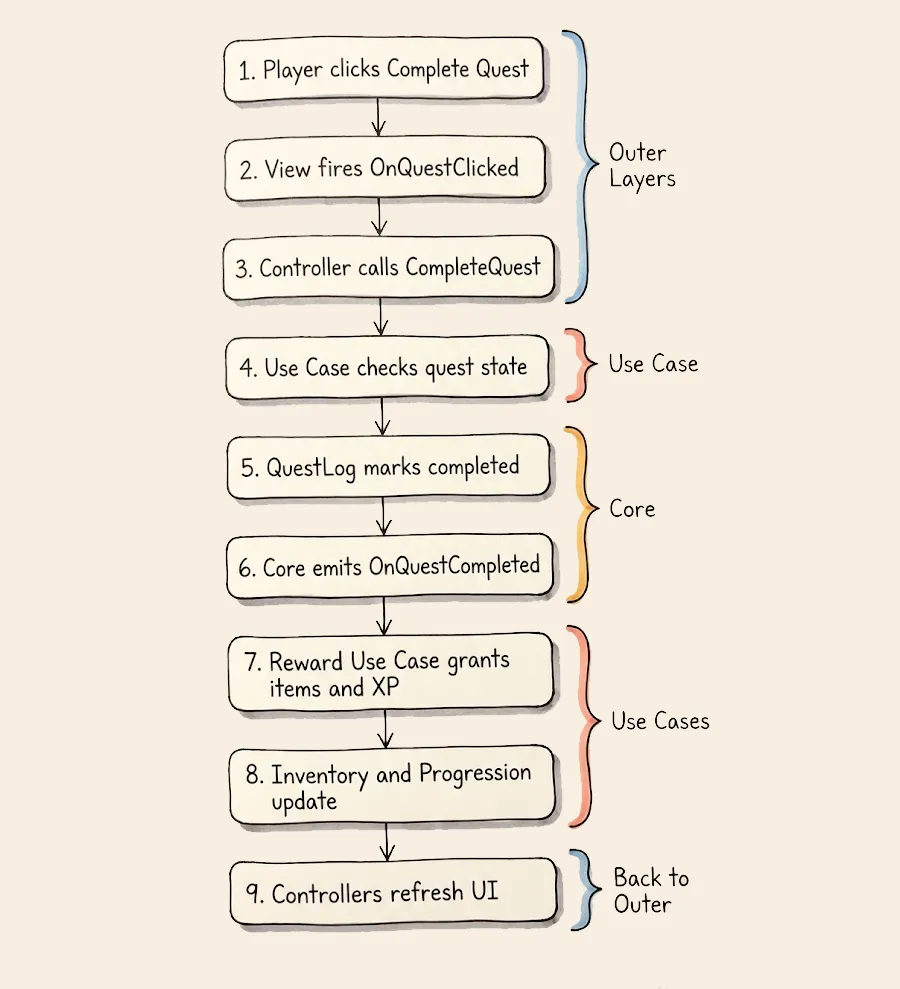
Every layer has a clear role. The Core owns state and rules. The Use Cases orchestrate. The Controllers translate between the player and the domain. Cross-feature interaction happens exclusively through Use Case interfaces.
The Test Seams
The vertical slice structure makes testing straightforward - every dependency is an interface, and every interface is a substitution point.
- Domain tests: Instantiate
QuestLogdirectly. No dependencies needed. Verify thatComplete()enforces invariants and emits events. - Use case tests: Inject test doubles for
IQuestLog,IAddItem,IGrantXP, andIRewardDialog. Verify the orchestration sequence - that rewards are granted only after the player claims, thatMarkRewarded()is called last. - Integration tests: Wire real Core objects with test doubles for Controllers and Views. Simulate the full flow from UI action to domain state change.
The slice structure makes it obvious what to mock: anything that crosses a layer boundary or a feature boundary is behind an interface. See Unit Tests for the full testing patterns.
Cross-Feature Boundaries
Quest completion doesn’t exist in isolation. It needs to grant items (Inventory feature) and award XP (Progression feature). These interactions happen through Use Case interfaces:
Features/
  Quests/
    UseCases/
      CompleteQuestUseCase  ->  depends on IAddItem, IGrantXP
  Inventory/
    UseCases/
      IAddItem              <-  published by Inventory
  Progression/
    UseCases/
      IGrantXP              <-  published by Progression
The Quest slice depends on interfaces from other features, never on their internals. It doesn’t know how the inventory stores items or how the progression system calculates level-ups. If the Inventory feature is completely rewritten internally, the Quest feature doesn’t change - as long as IAddItem still works.
This makes the dependency graph visible in the folder structure itself. Open CompleteQuestUseCase, see its constructor parameters, and you know exactly which other features this slice talks to and through what contracts.
When Slices Share Code
Sometimes two features need the same type. ItemId might appear in both Quest rewards and Inventory operations. PlayerId might be everywhere. These shared domain types live in a shared Core module - a small, stable set of types that multiple features reference.
Features/
  Shared/
    Core/
      ItemId
      PlayerId
      Currency
  Quests/
    ...
  Inventory/
    ...
Keep the shared module small. If it grows large, it’s a signal: either two features are more coupled than you thought (and should be one feature), or a third feature is hiding inside the shared code and should be extracted into its own slice.