The Game Object Model
The game engine as a browser: scene graph as GOM, game logic as JavaScript, Core as application state.
A Familiar Analogy
The web has a clean, well-understood separation of concerns:
- The DOM (Document Object Model) - a tree of elements that represents what’s on screen. Divs, buttons, text nodes, images. The browser reads this tree and renders it.
- The Browser - reads the DOM each frame, paints pixels, handles user input (clicks, key presses, scrolls), and exposes input back as events on DOM elements.
- JavaScript - listens to DOM events, executes business logic, and mutates the DOM in response.
Nobody puts their business logic inside the browser’s rendering engine. Nobody writes their e-commerce checkout flow as a CSS animation. The separation feels obvious.
Game engines have the same structure - but the game development world hasn’t recognized it yet.
The Three Layers
The Game Object Model (let’s call it GOM for a moment) - Scene State
Every game engine maintains a scene graph: a tree of objects that represents what exists in the game world right now. In Unity, these are GameObjects with Transform, Renderer, and UI components. In Unreal, Actors with components. In Godot, Nodes.
This is the Game Object Model - the engine’s representation of the world. It includes:
- World-space objects: a character model at position (12, 0, 5) with a running animation playing
- UI elements: a health bar showing 75% fill, a score label displaying “2,000”
- Physics bodies: a rigid body with mass 2.0, velocity (3, -1, 0)
- Audio sources: a sound emitter playing background music at 0.8 volume
- Particle systems, lights, cameras - everything the engine manages
The GOM is not the game’s truth. It’s a visual and physical representation of that truth, maintained by the engine. The health bar shows 75% because the Core says the player has 75 HP. The character model is at position (12, 0, 5) because the physics engine moved it there based on input and collisions.
The Game Engine - The “Browser”
The game engine’s role mirrors the browser’s:
- Render: Read the GOM every frame and produce pixels on screen
- Simulate physics: Update positions, velocities, and collisions of physics-enabled objects in the GOM
- Capture input: Detect mouse clicks, touch events, key presses, gamepad input
- Expose events: Report what happened back as events on GOM objects - “this object was clicked,” “these two objects collided,” “this animation finished”
The engine is the intermediary between the player and the GOM. It presents the GOM visually and feeds player actions back as events.
The Game Core - Abstract Truth
Separate from the GOM, there’s the abstract state of the game - the Core:
- The player has 75 HP out of 100
- The player owns a fire sword (+15 damage)
- Quest “Defeat the Dragon” is active, objective 2 of 3 completed
- The player has 2,340 gold
- The enemy “Dragon” has 500 HP and is in “enraged” state
This state has no position, no animation, no UI representation. It’s pure information. It could exist in a spreadsheet. It could be printed to a CLI terminal. It knows nothing about the engine.
Where Game Logic Sits
This is the crucial part. Game Logic is the synchronization layer between the GOM and the Core - the Controllers and Use Cases that face both directions:
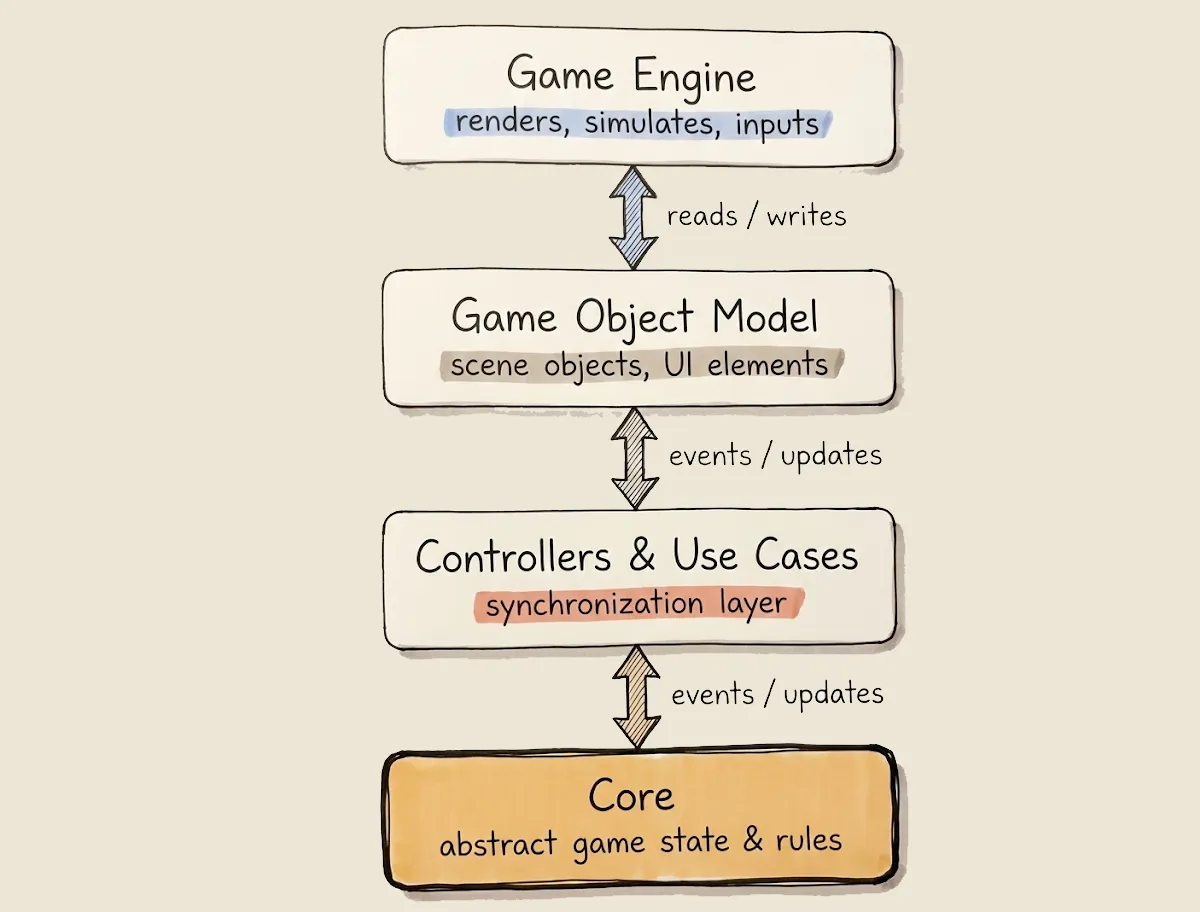
Game Logic performs two independent synchronization flows:
GOM Core: Interpreting the World
Events originate in the GOM - a collision happens, a button is clicked, a timer expires. Controllers and Use Cases interpret these events and translate them into Core operations:
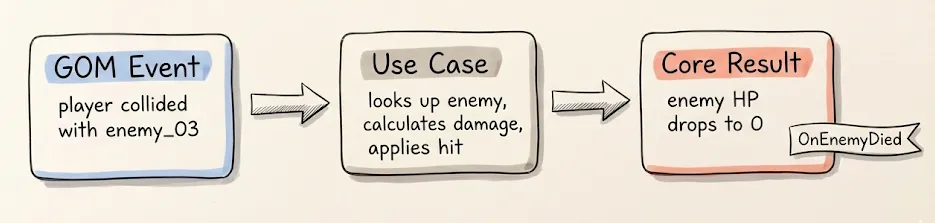
The GOM doesn’t decide that the enemy dies. It just reports a collision. The Use Cases layer interprets what that collision means according to the game rules. The Core records the truth.
Core GOM: Reflecting Truth
When Core state changes, the Game Logic translates those changes back into GOM updates:
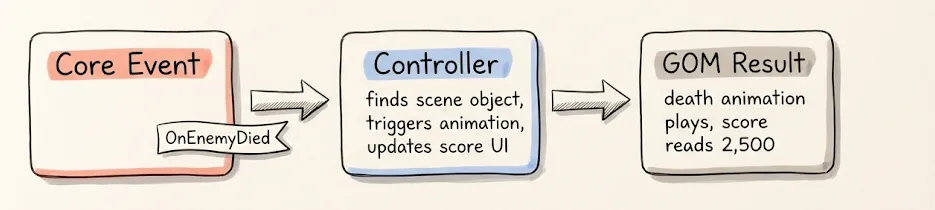
The Core doesn’t know about animations or score labels. It just announces that an enemy died. The Controllers decide what that means for the GOM.
Two Independent Flows
These two flows - GOMCore and CoreGOM - are independent. A Core state change might not come from the GOM at all (it could come from a network event, a timer, or a save file load). A GOM event might not result in a Core change (a purely visual interaction, like hovering over a tooltip).
This independence is what makes the system clean. The Core doesn’t know about the GOM. The GOM doesn’t know about the Core. Controllers and Use Cases bridge them, and each bridge is one-directional and event-driven.
What Stays Attached to the Engine
Not everything needs to pass through Controllers or Use Cases. Purely visual behaviors - things that don’t change game truth - can live directly on GOM objects:
- Idle animations - a character breathing, a torch flickering. No game state changes.
- Particle effects - sparkles on a collectible, dust when the player lands. Decorative.
- UI hover effects - a button changing color when the mouse hovers over it.
- Environmental animation - clouds moving, water flowing, trees swaying in wind.
- Audio ambiance - background music, ambient sounds tied to a scene region.
- Camera shake - a visual response to an explosion. The explosion might be Logic, but the shake is purely presentational.
These are the equivalent of CSS animations in web development. They make the experience richer, but they don’t affect the game’s state. Attaching them directly to engine objects is correct and appropriate - separating them would add complexity with no architectural benefit.
The test is simple: does this behavior change what’s true about the game? If a death animation plays, does the Core care? No - the Core already recorded the death. The animation is just the GOM catching up visually. It stays in the engine.
But if an animation has gameplay consequences - like a charging attack that can be interrupted, where the interruption changes damage output - then the state of the charge (started, interruptible, completed) is Core, even if the visual representation is an animation. The animation itself stays in the engine; the state it represents passes through Logic to Core.
The Web Analogy, Revisited
With the layers properly understood, the analogy is precise:
| Web | Game |
|---|---|
| GOM elements (div, button, input) | Scene objects (GameObjects, Actors, Nodes) |
| Browser rendering engine | Game engine renderer + physics |
| CSS animations / transitions | Idle animations, particle effects, UI hover states |
| JavaScript event listeners | Controllers subscribing to GOM events |
| JavaScript GOM manipulation | Controllers updating scene objects |
| Application state (Redux store, etc.) | Core (abstract game state) |
| API calls, localStorage | Services (persistence, network) |
And the flow:
| Web | Game |
|---|---|
| User clicks button JS handler update app state re-render GOM | Player hits enemy Controller Use Case updates Core Controller updates scene objects |
| Server pushes data update app state re-render GOM | Network event Use Case updates Core Controller updates scene objects |
The parallel is not superficial. It reflects the same fundamental insight: the presentation layer should be a reflection of application state, not the source of truth.
Why This Matters
It Explains What “Engine Independence” Really Means
When we say the Core should be engine-independent, developers imagine rewriting their game for a different engine. That’s not the point. The point is that the GOM is the engine’s responsibility, and the Core is yours. Controllers and Use Cases translate between them. This separation is valuable even if you never switch engines - because it makes each piece understandable, testable, and maintainable on its own.
It Clarifies What Game Logic Actually Does
In most game projects, “game logic” is a vague term for “code that makes things happen.” In this model, game logic has a precise role: synchronize the GOM and the Core. Controllers and Use Cases interpret GOM events as Core operations, and reflect Core state changes as GOM updates. That’s it. If code doesn’t do one of these two things, it’s either Core (pure rules), a Service (persistence, network), or a GOM behavior (purely visual).
It Makes the “Scripts on Objects” Problem Obvious
The traditional game development approach - “attach scripts to game objects” - collapses all three layers into one. A MonoBehaviour on a character handles input (GOM), calculates damage (Core), updates the health bar (GOM), saves progress (Service), and plays a sound (GOM) - all in one script, all tightly coupled.
The GOM model makes it clear why this is problematic: it’s mixing the document, the application state, and the synchronization logic into a single object. It’s as if a web developer put their database queries, business rules, and CSS all inside an onclick handler on a <div>.
It Defines the Boundary for Testing
Everything below the Controllers - the Core and Use Cases - is testable without the engine. Everything above - the GOM and engine - is inherently visual and engine-dependent. Controllers are testable when Views are replaced with test doubles. The boundary is clear and follows naturally from the model.
Connecting to the Architecture
The GOM model maps directly to the four-layer architecture:
| GOM concept | Architecture layer |
|---|---|
| Core (abstract game state) | Core |
| Logic (synchronization) | Use Cases / Controllers |
| GOM (scene objects, UI) | Views |
| Engine (rendering, physics, input) | External - the engine itself |
| Persistence, network, audio services | Services |
For a complete example of how these layers work together in practice - from domain state through orchestration and controllers to views - see Vertical Slice Example.